

Real-Time AI for Sales Calls: How In-Call Intelligence Works
Sales tools cover before and after the call — but not during. In-Call Intelligence gives reps AI-powered answers from your knowledge base in real time, without a bot joining the call.
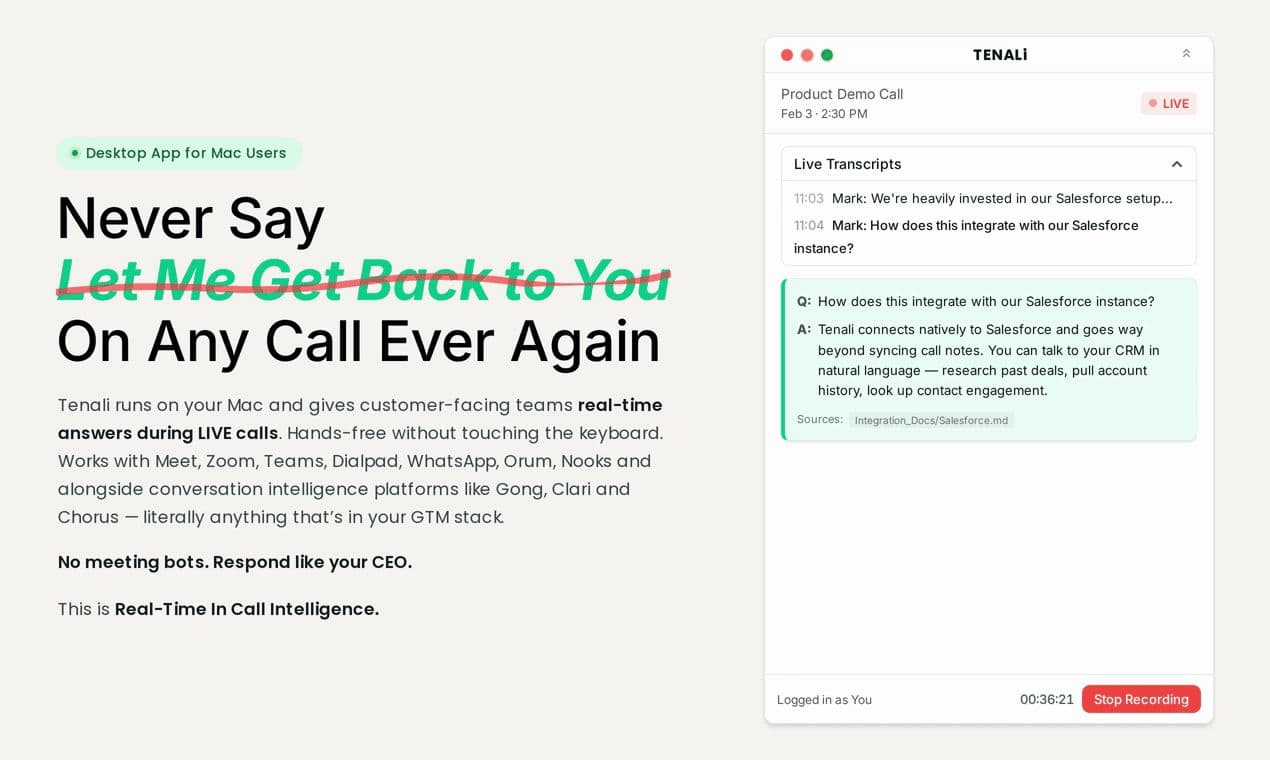
Sales teams have tools for every moment except the one that decides the deal.
Before the call, sales engagement platforms like Outreach, Salesloft, and Apollo help reps reach the right prospect with the right message. After the call, conversation intelligence tools like Gong, Clari, and Chorus record, transcribe, and analyze what happened — surfacing coaching insights, deal risks, and pipeline patterns.
But during the call — when a buyer asks a hard technical question and the rep needs the answer right now — there has been nothing there.
We built Tenali AI to fill that gap. We call this category In-Call Intelligence: AI that listens to live sales conversations, detects buyer questions in real time, and surfaces precise answers from your company's knowledge base — privately, on the rep's screen, without anyone on the call knowing AI is involved.
No meeting bot. No browser extension. No typing into a chatbot mid-conversation. Just a sales rep who always has the answer.
Why the "During the Call" Moment Matters
Every sales leader knows the pattern. A deal is moving. Budget is approved. The champion is aligned. Then a buyer asks a question the rep can't answer on the spot — about security architecture, competitive differentiation, pricing for a specific configuration, or a technical integration detail.
The rep says, "Great question — let me get back to you on that."
That single sentence extends the sales cycle by days or weeks. It opens the door for a competitor who did have the answer. It signals to the buyer that the rep doesn't fully understand their own product. According to industry research, the majority of sales reps consistently miss quota — and in most cases, the gap isn't product or pricing. It's the inability to deliver precise answers in the live moments that shape buyer confidence.
Post-call tools capture this problem after it's already happened. In-Call Intelligence prevents it from happening in the first place.
How Tenali AI Works
Tenali AI Desktop is a native macOS application. You download it, drag it to Applications, and sign in. Setup takes about 30 seconds.
On your next sales call, Tenali runs privately in the background. Here's what happens:
Real-Time Audio Capture — Without Joining the Call
Tenali uses the same system-level audio capture technology that powers screen recording on macOS. It listens to the audio playing through your system — your speakers or headphones — without injecting anything into the call itself. No participant joins. No recording notification fires. The meeting platform doesn't detect it.
This is fundamentally different from bot-based tools. Traditional meeting bots join the call as a visible participant, triggering a "Recording Bot has joined the meeting" notification. That notification changes the conversation. Prospects become guarded. The candid moments — where a buyer shares what the competitor quoted, what their CFO actually said, what's really blocking the deal — stop happening.
Tenali eliminates this entirely. The experience is private to the rep's screen. Your buyer simply sees a sales rep who sounds like a product expert.
Automatic Question Detection and Answer Retrieval
Tenali doesn't wait for the rep to type a query. It detects questions directly from the conversation — as they're being asked — and searches your company's knowledge base to surface the precise answer in a private overlay on the rep's screen.
This is fully hands-free. There's no alt-tabbing to a chatbot, no typing search queries while trying to maintain eye contact on a video call, no keyboard noise in the background. The answer appears automatically, in the moment it's needed.
Universal Platform Support
Tenali works on any application that plays audio on your Mac. That includes Zoom, Microsoft Teams, Google Meet, Dialpad, Orum, Nooks, WhatsApp, Slack huddles, and more.
This matters because sales conversations don't only happen on scheduled video calls. Cold calls on dialers, impromptu WhatsApp calls with prospects in different time zones, huddles with channel partners — they all benefit from the same real-time answer support.
Security and Compliance
Enterprise sales teams handle sensitive conversations. Tenali is built with that reality at its core.
SOC 2 Type II Certified. Tenali has completed SOC 2 Type II certification, the gold standard for enterprise SaaS security. This covers data handling, access controls, encryption, and operational procedures.
No Persistent Audio Storage. Audio is processed in real time for transcription and question detection. Conversations are not stored permanently and are never used to train AI models.
Rep-Side Only. The Tenali overlay is visible only on the rep's screen. No data is transmitted to anyone on the call. No recording notifications are triggered. No participant is added to the meeting.
Knowledge Base Access Controls. Tenali connects to your existing knowledge sources — internal documentation, CRM data, competitive intelligence, product specs — with role-based access controls that respect your existing permission structures.
How In-Call Intelligence Complements Conversation Intelligence
If you use Gong, Clari, Fathom, Fireflies, or any other conversation intelligence platform — Tenali isn't replacing those tools. It's covering a completely different moment in the sales workflow.
Think of the sales technology stack as three layers:
Sales Engagement (Before the Call): Outreach, Salesloft, Apollo — reaching the right prospect with the right message at the right time.
In-Call Intelligence (During the Call): Tenali AI — giving the rep the right answer in the live moment when it matters most.
Conversation Intelligence (After the Call): Gong, Clari, Chorus — recording, analyzing, and coaching based on what happened.
These layers are complementary. Conversation intelligence captures what happened. In-Call Intelligence makes sure the right thing happens in the first place. Together, they close the loop: reps perform better on the call, and the post-call analysis reflects stronger conversations, shorter sales cycles, and higher win rates.
The Story Behind Tenali
I built Tenali because of a moment I'll never forget.
I was running go-to-market for VMware in the Bay Area. Over five years, we'd scaled the franchise from zero to $100M in revenue. I knew the product inside and out — or so I thought.
It was 5 PM on the last day of the quarter. A $2M deal was on the line. Everything was in place — budget approved, champion aligned, legal cleared. Then the prospect's security lead asked two technical questions. Specific. Detailed. The kind that require exact answers, not hand-waving.
I didn't have them.
Slack messages flew. Internal documentation was scanned. Colleagues were pinged. By 6 PM, the window had closed. The deal was gone.
That deal didn't die because of product-market fit, pricing, or competition. It died because I couldn't get the right answer fast enough.
After that experience, I taught myself software engineering and spent the next three years building the solution I wished I'd had on that call. Tenali AI is the result — a platform designed around a simple principle: the answers should come to you. Not the other way around.
Getting Started
Tenali AI Desktop is available for macOS with a 14-day free trial. Installation takes 30 seconds, and it works on your very next call.
To learn more about how In-Call Intelligence can support your sales team, visit tenali.ai or request a demo.